

How AI Tools Can Help Home Renovation Planning Projects (4 Smart Uses — and 1 Warning)
Home renovations often reveal a hard truth: the 2025 Houzz & Home Study found that 37% of U.S. homeowners went over budget, while only 3% finished below budget. The issue is usually not the contractor or materials—it is the planning stage, which Houzz found can take nearly twice as long as the construction itself.
That’s exactly where AI tools have quietly become a homeowner’s best pre-construction assistant. Used well, they can tighten your budget, visualize your layout before a single wall comes down, and even help you talk to contractors like a pro. Used badly, they’ll hand you confident-sounding numbers that fall apart at the first quote.
This guide covers both sides — the four smartest ways to use AI in renovation planning, and the trap to avoid.
Why AI Belongs in Your Renovation Toolkit
The median U.S. renovation now runs about $20,000, and kitchens alone command a median of $24,000 (Houzz, 2026). With Harvard’s Joint Center for Housing Studies putting total U.S. remodeling spend above $500 billion a year, the cost of a planning mistake has never been higher.
AI tools — from chat assistants like ChatGPT and Claude to purpose-built apps like Planner 5D, RoomGPT, and Houzz Pro’s estimating features — compress weeks of research into hours. They don’t replace a contractor, an architect, or a permit office. They replace the blank-page stage—the point where many homeowners either plan too little and overspend, or research too much and delay the project for months.
1. Budget Planning and Material Estimates
This is the highest-value use of AI for most homeowners — and the one with the clearest payoff.
What AI does well here:
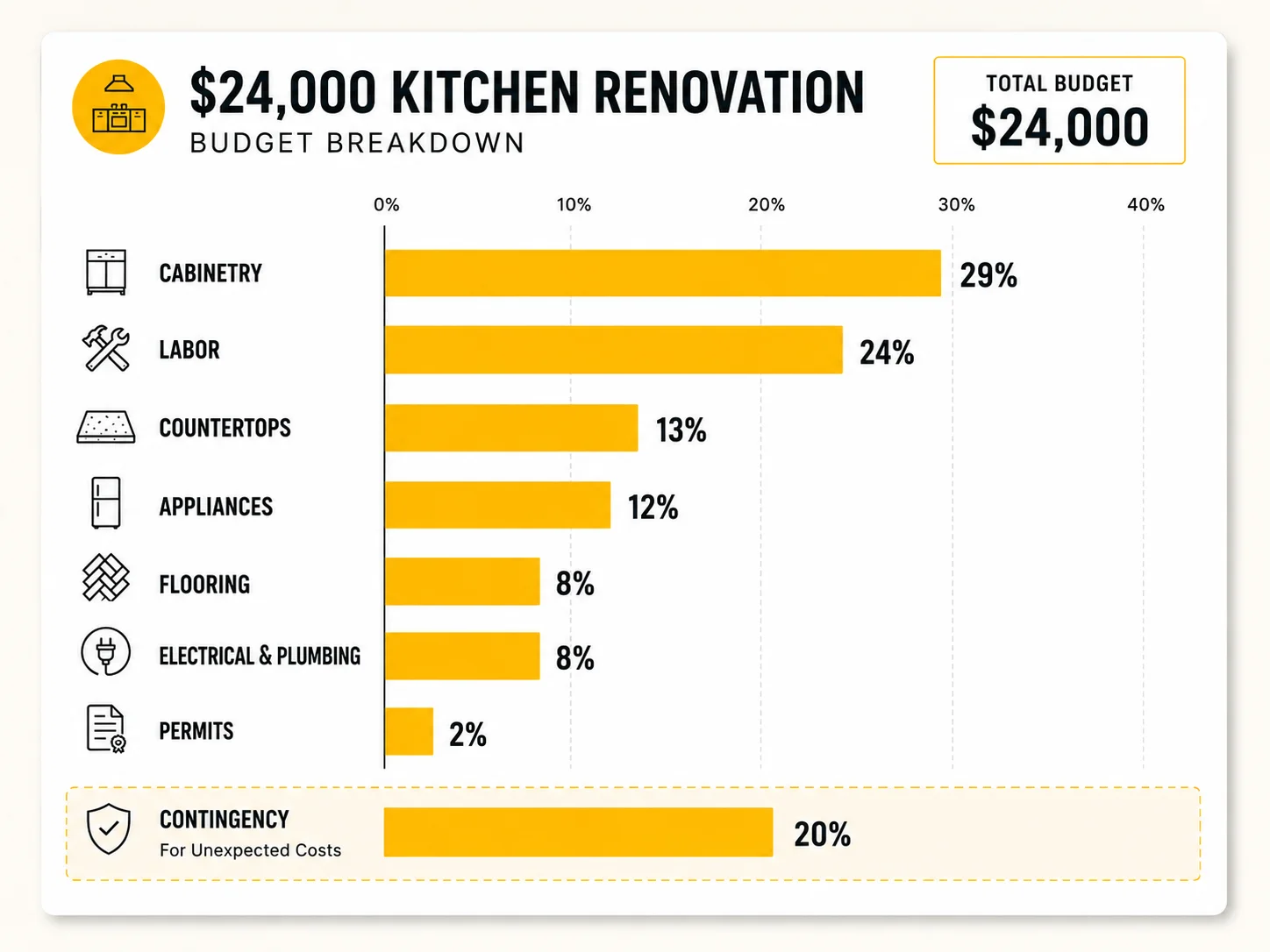
- Line-item budget drafts. Describe your project in plain English — “150 sq ft kitchen, mid-range finishes, keeping the existing layout, in Ohio” — and an AI assistant can produce a categorized budget draft: cabinetry, countertops, labor, electrical, plumbing, permits, contingency. It won’t be quote-accurate, but it gives you a structure that 1 in 4 homeowners admit they never build at all.
- Material quantity math. Flooring square footage with 10% waste factor, gallons of paint per coat, tile counts including cuts — AI handles this arithmetic instantly and shows its work, so you can sanity-check it.
- Simply ask, “What changes if I replace quartz with butcher block?” and receive an updated cost estimate in seconds—no spreadsheet revisions required.
- Contingency discipline. Good AI assistants will push you to hold back 15–20% as a contingency fund — the exact buffer industry experts recommend, and the one most over-budget homeowners skipped.
A real-world example: A homeowner planning a guest bathroom refresh (median U.S. spend: $7,000) prompts an AI assistant for a full budget breakdown. The draft flags $800–$1,200 for plumbing labor she hadn’t considered because the new vanity relocates the sink drain. That single flagged line item — surfaced before a contractor visit — is the difference between a realistic budget and a mid-project surprise.
The rule: treat AI estimates as a planning skeleton, then validate every major number against 2–3 local contractor quotes. Material prices vary sharply by region and month; AI training data doesn’t track your local lumberyard.
2. Design Inspiration and Layout Ideas
Design paralysis is real — and it’s expensive, because indecision mid-project is a leading driver of scope creep (31% of over-budget homeowners expanded their project midway, per Houzz).
Where AI shines:
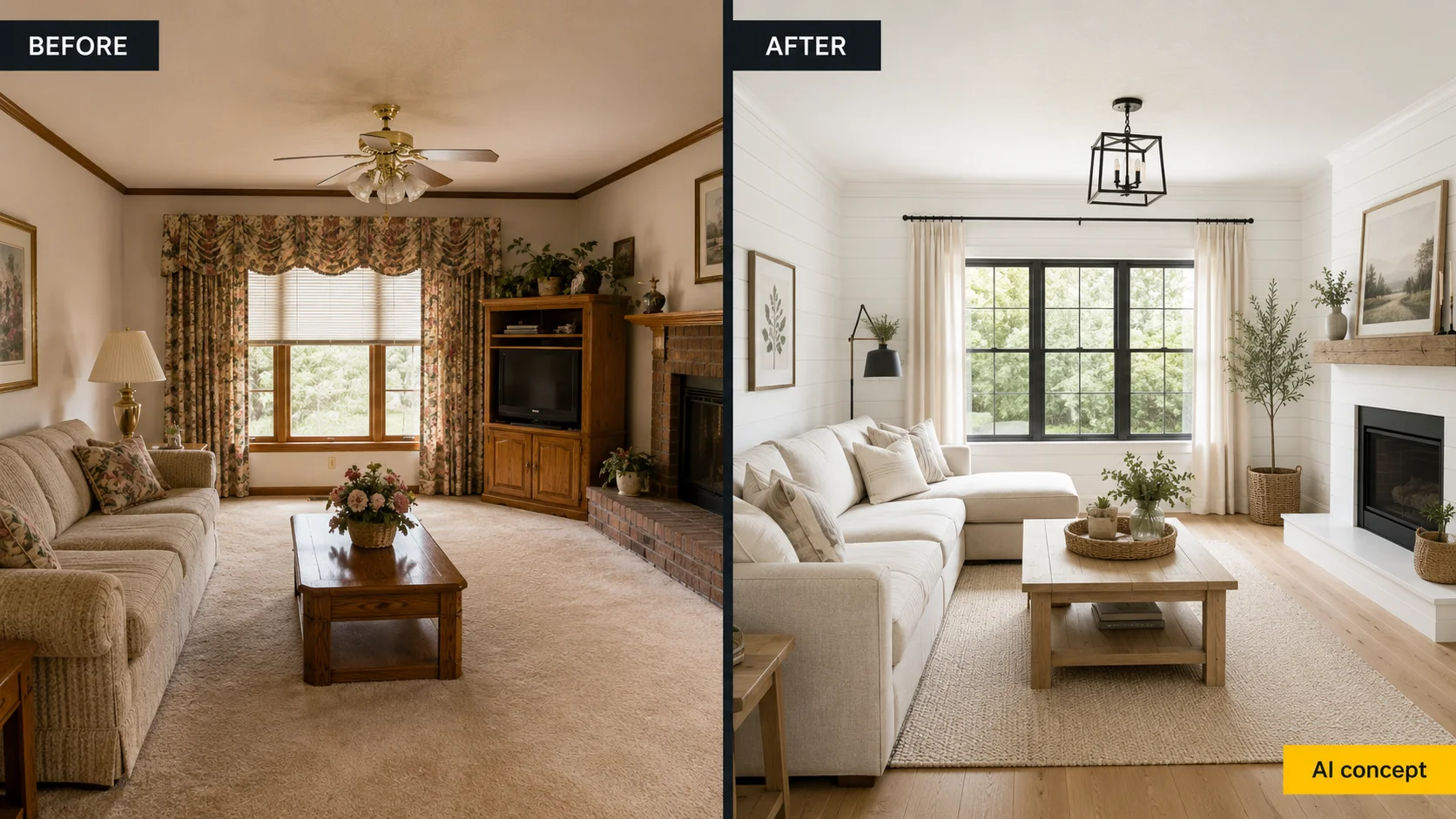
- Style discovery. Upload a photo of your living room to tools like RoomGPT, ReimagineHome, or Midjourney-style generators and see it re-rendered in Japandi, modern farmhouse, or mid-century styles. This beats scrolling 400 Pinterest pins because it uses your actual room — your window positions, your ceiling height, your awkward corner.
- Layout stress-testing. AI floor-plan tools (Planner 5D, Floorplanner with AI assist) let you test whether an island actually fits with 42″ clearances, or whether removing that wall opens the sightline you’re imagining — before you pay for drawings.
- Palette and material pairing. Ask an AI assistant to build a cohesive palette around one anchor choice (“white oak floors, brass hardware — give me three wall color directions with specific paint names”) and receive a practical shortlist you can take straight to the paint store.
- Fixture and finish shortlists. Instead of comparing 60 faucets, describe your budget, finish, and style and let AI narrow the field to 5 worth researching.
The catch: AI renders are aspirational, not structural. That gorgeous generated image may show a beam-free open span your load-bearing wall can’t deliver, or a window your plumbing stack occupies. Use renders to communicate a look, never as a construction document.
3. Contractor Communication Support
One of the most overlooked applications of AI in renovation planning is its ability to reduce unexpected expenses—the leading cause of budget overruns. According to the 2026 Houzz study, 52% of homeowners who exceeded their budgets cited unforeseen product or service costs. More often than not, “unexpected” expenses arise because important details were never clearly outlined upfront.
Practical ways homeowners use AI here:
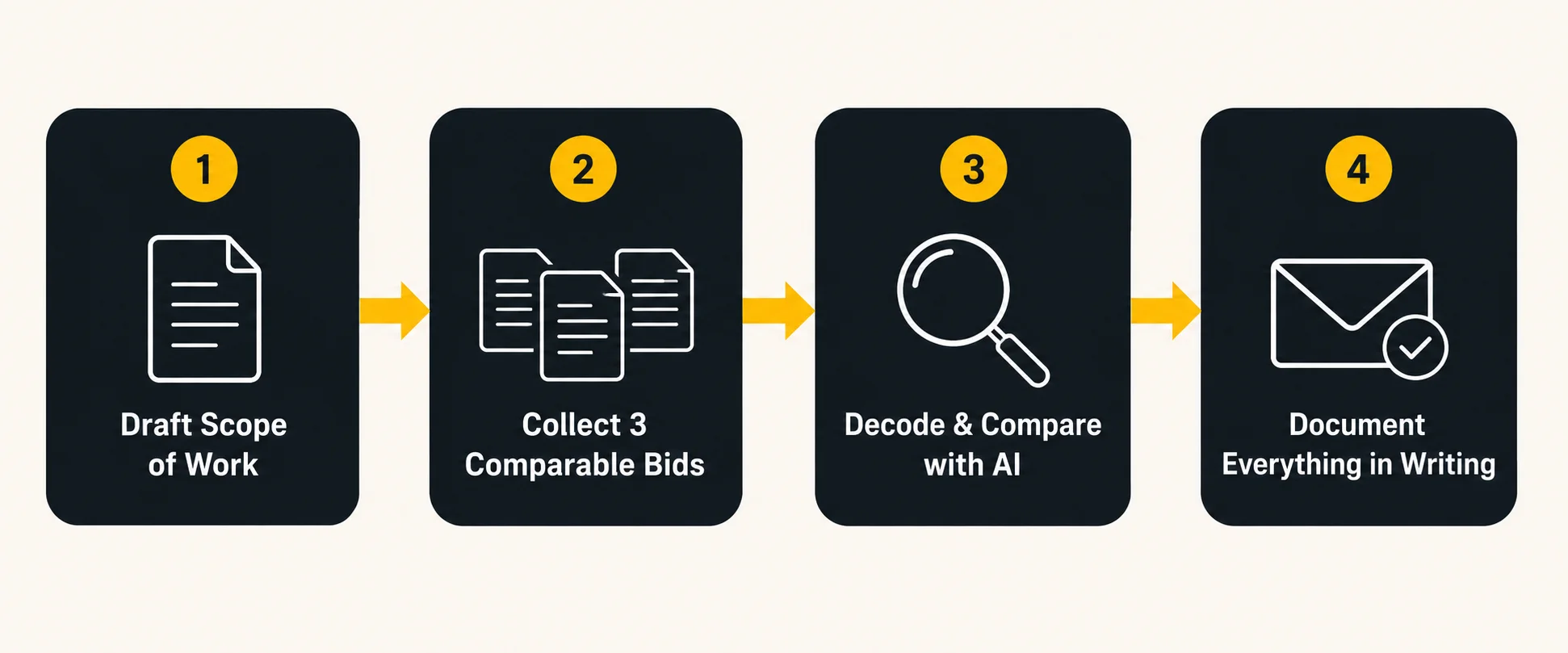
- Writing a proper scope of work. Tell an AI assistant what you want done, and have it draft a structured scope document: demolition, rough-in work, finishes, fixtures (who supplies what), cleanup, and exclusions. Handing contractors an identical written scope is the only way to get truly comparable bids.
- Decoding quotes and jargon. Paste in a confusing bid line — “R&R subfloor as needed, T&M” — and get a plain-English translation (remove and replace the subfloor, billed by time and materials, i.e., open-ended cost). Now you know exactly what to question.
- Generating question checklists. Before a walkthrough, ask AI for the 10 questions a general contractor would expect for your specific project type — licensing, insurance certificates, payment schedule, change-order process, lien waivers, daily cleanup.
- Drafting professional messages. Need to push back on a change order, chase a timeline, or document a verbal agreement in writing? AI drafts a firm-but-polite email in 30 seconds, which keeps a paper trail — something 91% of renovating homeowners who hire pros will eventually be glad they have.
A quick scenario: Three contractors bid your bathroom at $9,800, $12,400, and $16,900. Rather than assuming the middle bid is the safest option, paste all three estimates (with personal information removed) into an AI assistant and ask it to identify what each proposal includes and excludes. It flags that the low bid excludes waterproofing membrane and tile — suddenly the spread makes sense, and you know exactly what to ask each contractor before signing.
4. Avoiding Overreliance on AI Suggestions
Here’s the warning every “AI renovation” listicle skips: AI is a planning assistant, not a licensed professional — and treating it as one is how homeowners get hurt financially or physically.
Where you must not substitute AI for a human expert:
- Structural decisions. AI cannot determine which walls are load-bearing, what is concealed behind them, or how much weight your floor joists can safely support. Only an on-site structural engineer or qualified contractor can.
- Permits and code compliance. Building codes vary by state, county, and city, and they change. AI can explain concepts (why egress windows exist), but your local building department is the only authority on what your project requires. Verify every permit-related claim with your municipality before work begins.
- Electrical, gas, and plumbing. These trades require licensed professionals for good reason. Use AI to understand what an electrician is proposing — never to decide you can skip one.
- Exact pricing. AI estimates are built from broad training data, not this month’s material prices at your local suppliers or your region’s labor rates. A number that looks precise can still be 30% off.
Healthy AI habits for renovators:
- Verify, then trust. Cross-check any AI cost figure against at least two local quotes or current retailer prices.
- Use AI for structure, humans for judgment. Let AI organize the plan; let professionals make the calls that carry legal, safety, or structural weight.
- Watch for confident nonsense. AI states wrong answers as fluently as right ones. If a claim would cost real money if wrong, it needs a second source.
- Keep the final decision yours. AI can shortlist five faucets; only you know how your household actually lives.
The homeowners who win with AI aren’t the ones who automate their renovation — they’re the ones who show up to every contractor meeting better prepared than the contractor expects.
Common Mistakes Homeowners Make With AI Planning
- Treating an AI render as a promise. Generated images ignore plumbing stacks, HVAC runs, and load paths. Beautiful ≠ buildable.
- Skipping the contingency because “the AI estimate was thorough.” Hold 15–20% back regardless. Over a third of renovators still go over budget.
- Using one mega-prompt instead of a conversation. You get dramatically better budgets and layouts by iterating — answer the AI’s follow-up questions about square footage, finishes, and region.
- Feeding AI vague inputs. “Renovate my kitchen” gets generic output. “12×14 ft kitchen, 1987 house, keeping plumbing locations, mid-range finishes, Midwest” gets a usable plan.
- Sharing sensitive details. Keep contracts’ personal information, addresses, and financial account details out of AI tools; share project specs only.
FAQ
What is the best AI tool for planning a home renovation? There isn’t a one-size-fits-all solution—it depends on the specific task. Conversational assistants (ChatGPT, Claude) are strongest for budgets, scopes of work, and contractor communication. Visual tools like RoomGPT, ReimagineHome, and Planner 5D lead for design renders and layout testing. Most homeowners get the best results combining one of each.
Can AI accurately estimate my renovation costs? AI can build a realistic budget structure and catch categories you’d forget, but its dollar figures are directional, not quote-accurate. Regional labor rates and current material prices swing widely. Always validate against 2–3 local contractor bids and add a 15–20% contingency.
Are AI interior design tools free? Many offer free tiers — RoomGPT and Planner 5D include limited free renders, and general AI assistants handle budgeting and planning at no cost on basic plans. Expect $10–$30/month for higher-resolution renders, more redesigns, or pro floor-plan features.
Can AI replace an architect or contractor? No. AI can’t assess structural conditions, pull permits, verify code compliance, or perform licensed trade work. It’s best used to prepare for professionals — clearer scope, better questions, comparable bids — not to replace them.
Is it safe to share my home’s details with AI tools? Project details (room sizes, finishes, budget ranges) are generally fine. Avoid sharing your full address, financial account information, alarm/security details, or documents containing personal data. Check each tool’s privacy policy if uploading photos of your home.
Planning a bigger project? A clear budget, a written scope, and three comparable bids will do more for your renovation than any single tool — AI just gets you there faster.